I’ve been playing via the nvidia streaming service as previously mentioned and thought it was pretty much too good to be true for the price. I was hoping to extend the life of my current hardware for a year or so. But then… prices for hardware started to rise yet again and I was told by both my partner and a colleague they had read that it was going to continue to get worse. And I panicked a little bit. Things that are too good to be true don’t last.
Also, I must admit as a dev, gamer and occasional photographer) I am maybe on the weird side of the “how much hardware do I need” spectrum. Besides boardgames that’s one of the things… that tend to accumulate… even though I dream of the “single device” (I almost had it in an Asus Tablet Hybrid but it comes with only 32GB RAM which is way not enough)
So I panicked and while I didn’t buy toilet paper, I did buy a bunch of PC components and decided to build a desktop for the first time since the 00s. (I have been using laptops as my primary computer since around 2010 when I started freelancing).
I turns out I had to watch videos and google an awful lot of stuff. The chatbots are also really quite good at a lot of this. I only took about 10 hours to build the thing including inverting the case because the thing has to go on the left side of my desk and of course I am not buying a bunch of expensive components without making sure I have a window to look at them in my case.
And today I installed a gaming optimized linux distro (Nobara) on it. Steam runs just fine and I can play Borderlands 4 with very nice settings and good FPS. I also checked that all my favorite games will now work.
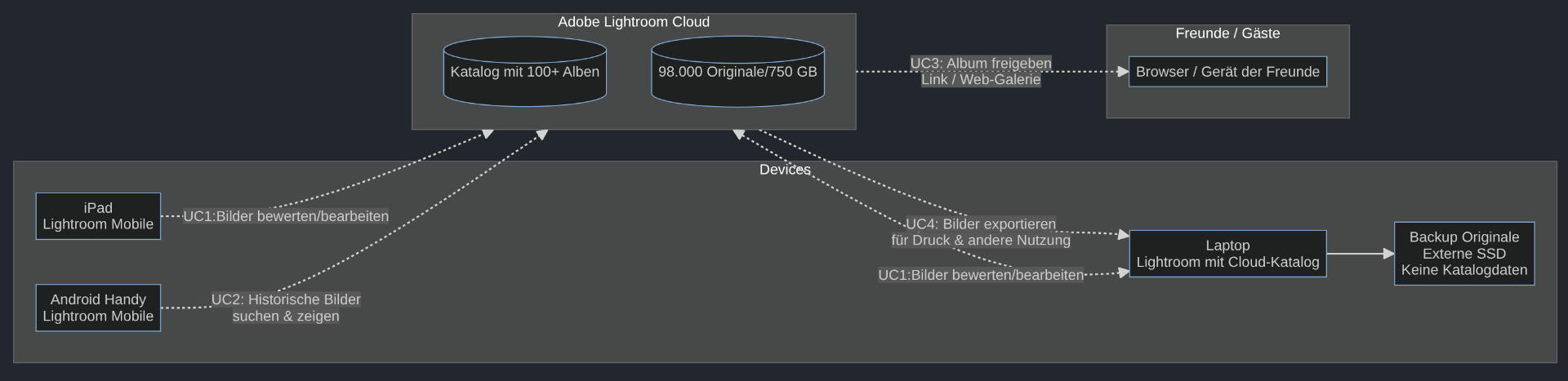
I have two things left on windows that are known to work badly on Linux: my tax/bookkeeping program … and Adobe Lightroom. I know Adobe is the bad guys and I so wish I could bring myself to quit Lightroom but for a 1000 reasons I don’t–if and when they enter the final stage of enshittification I have a plan… but before that I will most likely stick with it.
Almost everything else runs equivalent or better on linux because I use a lot of OSS anyway.
Now the joy of setting up a new system… while not quite knowing if I will stick with Nobara…
(it is based on Fedora which is based on RedHat which the chatbot told me has good kvm/qemu support for my windows virtualization needs → lightroom will need access to the GPU. Luckily my processor has built-in graphics as well, so I can do better setups once I get to that)
I started speccing out a new PC build last week. In the time I was considering the RAM it went from £200 to £400. So I won’t be building a new PC any time soon.
I know the RAM was going through the roof. And SSDs are not far behind. At the start of the year it was GPUs. Almost all hardware being built until the end of 2027 is already spoken for or so I was told … courtesy of all those big AI data centers that nobody will need once the bubble bursts …
Had I made the decision a month ago… I would probably have bought the same PC for a bit less.
It took me a good long while to get to the point where I was willing to depart from having a laptop as primary machine.
Basic specs
AMD Ryzen 7
64 GB Kingston Ram
MSI Nvidia 5070Ti
4 TB SSD
A BeQuiet case, cpu cooler (air), fans and power unit
None of the prebuilt stuff comes with the RAM and SSD specs I want. Which is another reason not to buy a laptop because the few that have this come with the premium GPUs that I don’t want to pay for. 1/3 of the price was the GPU… and it’s just upper-midrange. I was buying an upper-midrange GPUs when I bought my first PC in the mid-90s and thought “when I grow up and earn money I will buy the best GPU available on the market” – I was young and naive. I am not willing to pay 3.000 moneys for a 5090 from nvidia.
I decided to buy a new monitor before December but the PC upgrade has to wait till. Everything I want to play still runs, so I just hope I can wait a couple years before I have to do something about it.
I bought my stuff for semi-normalish prices or at least with a bit of “lag” (the shop I used seems to have big stockpiles and doesn’t automatically raise prices for stuff they bought for let’s say August prices for October price)
It has “white flickering” artifacts on the screen–and it has nothing to do with performance and settings. It’s a known issue between the nvidia dlss frame generation from the driver specifically with the 50 series of GPUs, the unreal engine and the game itself. I have hopes that the current iteration on my machine is caused by the DLC and I might delete the shader cache and see what happens.
Satisfactory looks gorgeous on super high settings
Cyberpunk runs with 52-66 fps on ultra raytracing settings and it looks fantastic.
It’s a Borderlands 4 issue and not my hardware … mimimi. I tried various things including a beta driver that was completely breaking my system. Using a different proton engine … there are a few more things I can try according to perplexity… and I will but so far nothing sticks. Fixing these issues is not a priority for the Borderlands 4 Team, they have enough other bigger issues (bigger because it concerns the whole player base not just the linux niche).
Maybe I should try to see how Borderlands 3 is running
I really like being back on a Linux system after so many years. I will try to make it work. But yesterday I was on the verge of giving up multiple times…
edit: someone on reddit figured out that most of the blame for the white flickering goes to the usage of an Unreal5 Engine optimization for edge detection (Gearbox possibly turned this on because they were desparate to get more performance to the playerbase grumbling about the horrible performance of their game). It is possible to manually turn this off in the depths of the directory trees where I will surely forget it… at the cost of about 20fps. After that the game looks nice enough. But 50 fps in single player is borderline … and that’s for a very new computer -.-
Do games nowadays not have graphical detail settings that you can turn down to increase the frame rate?
50fps sounds like it would be really good? I feel like I was perfectly happy if a game managed around 20fps back when I played lots of games. I guess if I was used to 50+, though, I’d probably want that too.
The graphics settings changed nothing on low. The white flickering remained. It was caused by an unreal engine optimization that the game either uses incorrectly or that the linux nvidia driver implements badly (likely both). When I turned it off, I lost 20fps and the white flickering went away completely. Most of the flickers were on edges of objects…
Borderlands is a pretty fast game 50fps is okay-ish. I am just grumbling because I was as high as 70fps and my partner who has no 4k screen plays at 150+
It used to be that in multiplayer my fps would be going way down and at <25fps the game becomes unplayable. On my laptop I got down to 10fps in a 4 player game regularly. However, with the new computer I have a much newer CPU as well and apparently this helps mititgate the framerates for multiplayer (or so my partner claims and in our 2 player game last night it proved true, that I had no loss of fps)
If the game is rendering at the resolution of your 4K screen, that seems like an enormous amount of work. Setting the rendering resolution to half that (in each dimension), but scaled up by exactly 2x for display, would (hopefully) give a clean-looking display with a quarter of the rendering effort, which I’d imagine would give you a much faster frame-rate.
I tried downgrading it looked even worse at lower resolutions. At least before I put in the Unreal Engine fix. I might try again now that the weird errors are fixed. Because yes 4k is a major factor in the fps.
I want a 4k display because it looks so much better for everything else I do. Not for gaming, it’s just a resource drain for that. But for everything else… …
Assuming “4K” is double 1920x1080 in each dimension (which I think is true?), then I’d think 1920x1080 is the one to use, so that the monitor could then scale each pixel to an exact 2x2 block.
I’m… mostly sure it’s the monitor which should be doing the scaling (or could be configured to), so the game would just think it was being displayed at the 1920x1080 resolution.
I feel that’s how these things used to work, anyway. I’m aware that all my standard tricks are decades out of date, though, so I’ll bow out here.
Some monitors actually have “dual mode” and they have some ability to display different scales. The one I am currently still using (new ones incoming… still 4k) doesn’t have this feature.
I tried going to a lower resolution last night. Now that the graphics errors are fixed, it looked fine. And gave me back the 20+ fps I was missing. It should be more really. But the Nvidia Drivers for Linux are apparently … bad.
Going with Linux was a spontaneous decision. If I had planned for it I would have bought a Radeon. The drivers are apparently better–our friend who games on Linux as well has no complaints about BL4 and his Radeon GPU.
wish me luck.
because bluetooth wasn’t working (still isn’t most likely) I did the thing and updated my BIOS
and now I spent all afternoon rescuing my system which mainly ended up being that i fixed my data (hopefully–although none of it is actually unique to the system yet, just about 0.5 TB of downloaded stuff) in a distinct /home partition (i was going to do that anyway at some point).
the suckage that is nvidia linux drivers… got destroyed through some part of the bios update or my attempts at fixing things that may not have needed fixing? In any case I am currently re-installing the actual linux and hoping that I managed to save my /home and my windows VM …
bah. yikes. I am sorely out of practice running and saving linux installs. but despite this I totally blame the stupid nvidia drivers.
edit: 90% of my system is back. a few smaller spots of trouble. and i haven’T dared look at the windows vm i made… i hope it will come back or I wasted a 3€ license key activation…
edit2: firefox gave me the most trouble. i lost my profile because firefox needs the nvidia drivers to run!!! wtf. and with all of my not realizing that the “hey this image comes with pre-installed nvidia drivers” things… … i managed to save the windows vm though that is worth more. so things are almost where they were about 10 hours ago including Bluetooth not working not even with the stupid dongle.
it has been mostly stable since my last post and i now have a working bluetooth dongle. being back on linux feels really nice still.
main concern remains the windows vm. one of the important programs in there is tax software and they appear to be using a library that needs gpu power for no reason at all. so now i need to figure out if i can get that into the vm without severely impacting the host system…
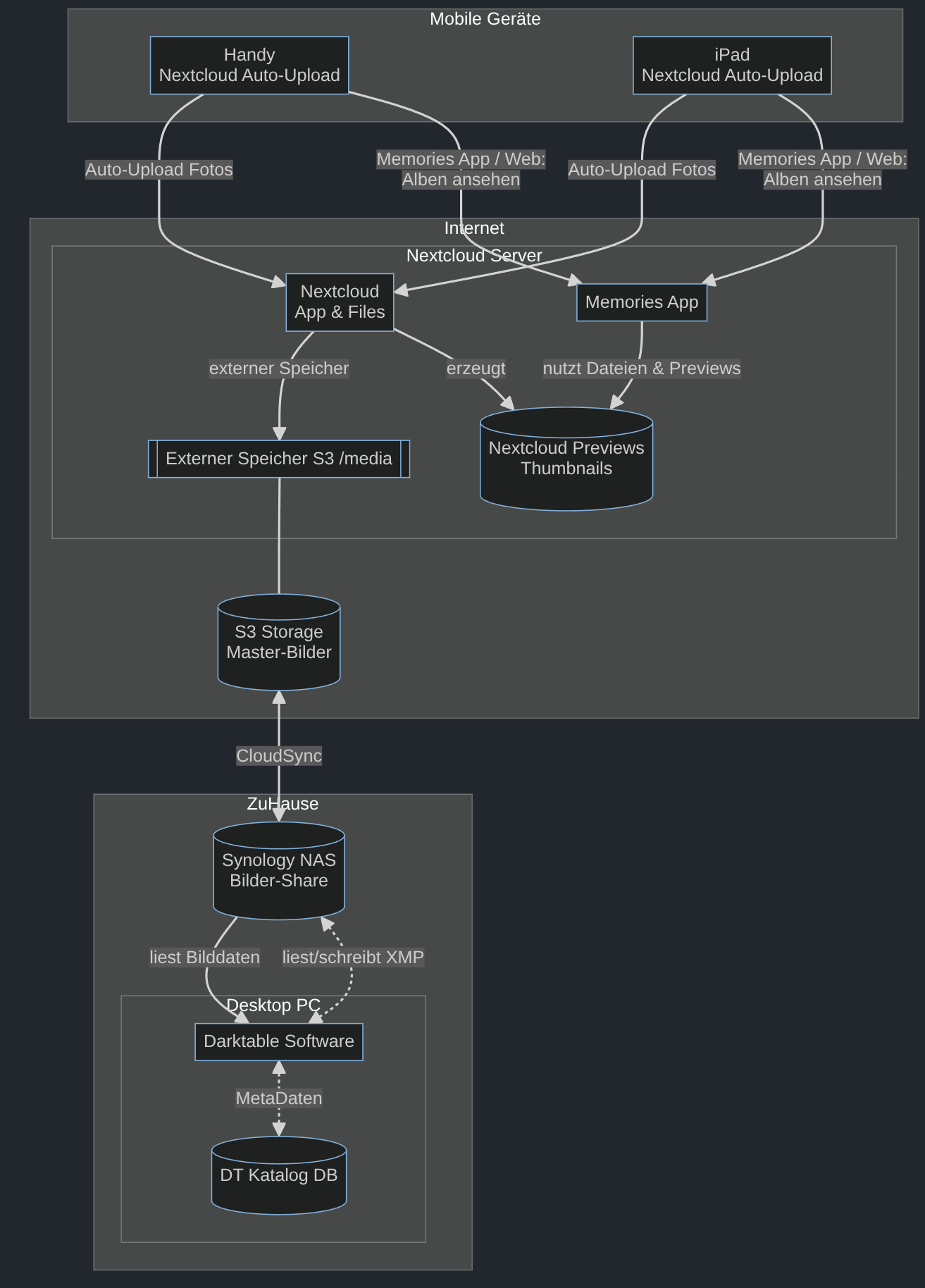
The second setup is lacking meta data in the cloud.
I have ideas how to maybe achieve that.
If I can do it, I might finally be able to contribute something to an open source project.
I thought someone might be interested in how I am getting my data freed–if I am. I am still considering sticking with Adobe until solutions come along that require less technology wrangling on my part.
This feels more like work than work sometimes with Linux. It is probably worth it. But I wish so much Adobe would just support Linux or let me have my Meta Data local or … both?
At least after many days of watching Cloud Sync run on our NAS… we’re green. I have uploaded all my existing images!
PS: these are mermaid graphs, anyone in need of lots of badly layouted but still impressive graphs… go check out mermaid.js we love them at work and apparently at home, too.
Since Adobe won’t sell me their software, only rent it, that’s not a thing I’d be prepared to use even if they supported Linux, which they don’t. That’s easy for me to say, of course, my photo collection is a few thousand directories called things like 20251226.boxing-day-boardgames.